


Grocery List App - rShopping
4.5430.00 Reviews
App Specs
- Version
- 2.6.25
- Updated On
- License
- Free
- Downloads
- 100,000+
- Developer
- ((RayDar)) Connected
- Categories
- Shopping
- Platform
- Android
Screenshots
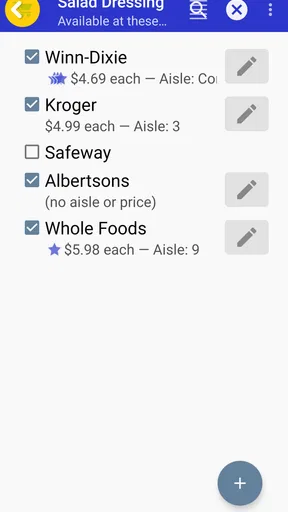
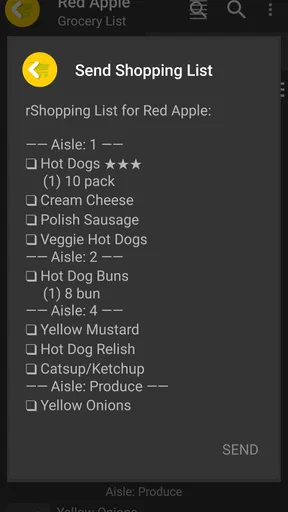
 Analysis by AppCompare
I like a grocery-list app best when it helps me make fewer decisions in the shop, not when it tries to turn a simple errand into a project. Grocery List App - rShopping is aimed at that practical job: keeping items together and making a trip easier to follow. Its usefulness depends less on bells and whistles than on whether the list is ready when I need it, especially when plans change or I’m moving between home, work, and the store.
When the network becomes part of the shopping trip
A list that can be shared is most useful when two people are coordinating the same shop. If one person adds something from home while the other is already out, the promise of a current list can prevent duplicated purchases and last-minute messages. I would still treat connectivity as part of that workflow: before relying on a shared list in a busy shop, open it while connected and make sure the items you expect to see are there. That small check is more dependable than assuming every change will appear instantly in every situation.
Shared lists also work best when everyone uses them consistently. A household can agree that the person who notices an item running low adds it immediately, while the shopper checks items off only after putting them in the basket. That habit keeps the list useful without turning it into a running conversation. If someone prefers to send a quick text instead, the app’s shared-list approach may feel like extra coordination rather than a benefit.
A practical routine for different kinds of shops
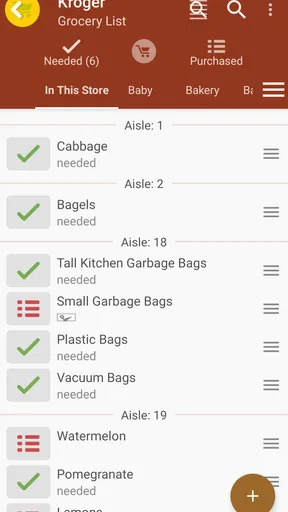
I’d use the app differently for a planned weekly shop and a quick stop. For the larger trip, grouping items by aisle can help me keep a sensible route through a familiar store. Before leaving, I’d scan the list once and move any vague entries—such as “snacks” or “something for dinner”—toward a specific choice. That is not busywork: the more precise the list, the less likely I am to wander around deciding what I meant while standing in an aisle.
For a small top-up, I’d keep the list short and check items off as I pick them up. If I’m shopping with someone else, deciding in advance who is responsible for which section can reduce overlap; the list is a shared reference, not a substitute for agreeing on the plan. A useful trade-off is that organization helps only when I maintain it. If I add the same item in several ways or leave completed entries uncleared, even a tidy interface can become harder to scan.
Where it fits among shopping tools
Compared with a paper note, a phone list is easier to revise when I remember one more item and less likely to be left on the kitchen counter. Compared with a general notes app, a grocery-focused tool can make the trip feel more structured through item grouping and check-offs. But a plain note may be the better choice for someone who wants the fewest steps possible, while a retailer’s own app may suit shoppers who mainly need store-specific product information or ordering. I would choose rShopping for organizing a shopping list, not assume it replaces every other shopping service.
The app is a reasonable fit for people who shop regularly, share household errands, or often forget small essentials. It may be less appealing if you rarely make lists, prefer pen and paper, or expect detailed product research and purchase handling in the same place. The key question is whether list organization solves a real annoyance for you. If your main problem is deciding what to buy, the app can hold your choices, but it cannot make those choices for you.
Worth Reading Before You Choose

EA SPORTS FC Mobile 26 Is a Bigger Football Game, but It Takes Time

Flipboard Shows What News Apps Must Do Beyond the Feed

Switching to Android Auto Means Rethinking Your Driving Routine

Google Calendar Makes a Crowded Week Easier to Manage

Ludo King Makes the Most of the Minutes Between Plans

Baby Panda World Brings Quick Play to Modern Phones, but Its Game Library Feels Busy
Setup, cost, and the details worth checking
As a shopping app from ((RayDar)) Connected, rShopping is free to download, with optional in-app purchases priced from $0.99 to $1.49 per item. I’d start with the free experience and decide whether any paid option matters to my routine before spending. It is rated for Everyone, has a 4.6 average from around 1.6K ratings, and has been installed over 100K times. Those figures suggest that it has found an audience, but they cannot tell me whether its particular list-sharing workflow suits my household.
The current version is 2.6.25, and it requires iOS 8.0 or later. If you are setting it up on an older device, checking that requirement first can save an unnecessary download attempt. I would also test the parts I plan to rely on—especially sharing and reminders—before building a complicated routine around them. A quick trial with a small list is a better way to judge the fit than transferring every household staple at once.
What happens when plans change
Grocery trips rarely go exactly to plan: an item may be unavailable, a substitute may be needed, or someone may remember an extra ingredient midway through the day. I find it helpful to use list entries that are easy to recognize rather than relying on a private shorthand only I understand. For shared use, a short note in the item name can clarify a preference, such as a particular variety, without requiring a separate conversation at the shelf.
There is a limit to what a list can solve. If a network interruption affects a shared update, I would avoid assuming that the other shopper has seen it; a quick message through a channel both people already use is the safer fallback for a time-sensitive change. Likewise, I would not rely on a reminder as the only prompt for an important errand. The app can support a routine, but keeping a backup for urgent plans is sensible when connectivity or attention is uncertain.
For a realistic routine, imagine I notice we are nearly out of a few staples while making breakfast. I can add them then, rather than trusting myself to remember later, and a housemate can add their own needs before heading out. At the store, I can follow the aisle grouping and check off each purchase. If one of us changes the plan, we can use the shared list when the connection is available and confirm anything important directly. That is where the app’s value lies: it gives a household a common place to organize the errand, while still leaving room for ordinary communication.
Getting Started with rShopping
The first thing I noticed about rShopping was how easy it was to set up. You just download the app, and boom, you’re ready to start organizing your grocery lists. The interface is super intuitive, which means you won’t spend ages trying to figure out how to add items or create new lists. Right from the get-go, the app feels like it’s designed to make your life easier.
Features that Stand Out
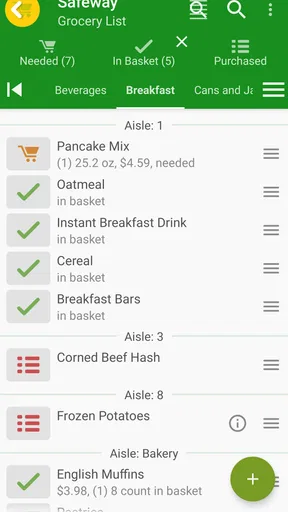
What really sets this app apart are the little features that make a big difference. For instance, you can categorize your shopping items by aisle, which is a total game-changer if you’re someone who likes to shop efficiently. No more zig-zagging across the store!
Another feature I absolutely love is the ability to share lists. If you’ve got a roommate or a partner, you can both add things to the list, and it updates in real-time. So, if someone’s already picked up the milk, you’ll know before you grab another carton. It’s perfect for avoiding those "oops" moments.
Using the App in Daily Life
In my everyday life, rShopping has actually saved me time and stress. I used to have random sticky notes and digital notes scattered everywhere. Now, everything’s in one place. Plus, I can add items on the fly, whether I’m at work or chilling at home. The app also lets you set reminders, which is great because, let’s be honest, we all forget things sometimes.
Little Things I Appreciate
One of the underestimated features is the option to check off items as you shop. It might sound simple, but there’s something oddly satisfying about ticking off items on your list. It really helps to make sure you’re not missing anything, especially when you’re in a rush.
Also, the app’s design is sleek and minimalistic. It’s not cluttered with ads or unnecessary features, which is refreshing. You can focus on what’s important: getting in and out of the store with everything you need.
Wrap Up
All in all, the Grocery List App - rShopping has been a lifesaver. It’s like having an organized friend who keeps track of everything for you. Whether you’re a busy parent, a student, or just someone who wants to streamline their shopping experience, this app is worth checking out. It’s made my shopping trips quicker and way less stressful, and I bet it’ll do the same for you.
So, if you’re tired of forgetting items or making multiple trips to the store, give rShopping a try. It might just be the grocery shopping companion you never knew you needed.
Pros
- Intuitive user interface for easy navigation.
- Syncs lists across multiple devices seamlessly.
- Supports voice input for quick list creation.
- Customizable categories for better organization.
- Barcode scanner for adding items instantly.
Cons
- Requires internet for syncing features.
- Limited free version with ads.
- Occasional crashes on older devices.
- No recipe integration or meal planning.
- Barcode scanner occasionally misses items.
FAQs for Grocery List App - rShopping
What features does the Grocery List App - rShopping offer?
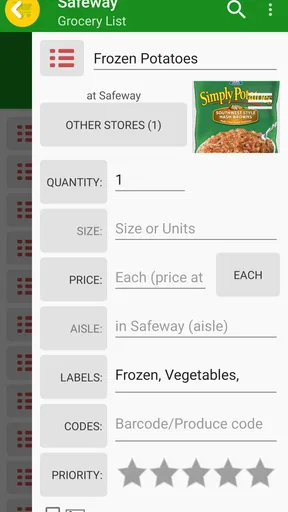
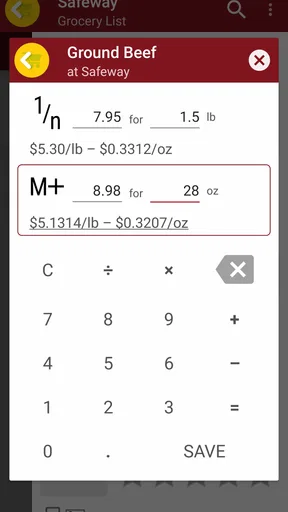
Grocery List App - rShopping offers a variety of features to enhance your shopping experience. You can create multiple lists, categorize items, and even share lists with family members. The app also includes a barcode scanner for easy addition of items and a price tracker to help you stay within your budget.
Is Grocery List App - rShopping available on both Android and iOS?
Yes, the Grocery List App - rShopping is available for download on both Android and iOS platforms. It provides a seamless user experience across devices, ensuring that your shopping lists are synchronized, whether you’re using a smartphone or a tablet.
Does the app require an internet connection to function?
While some features of Grocery List App - rShopping do require an internet connection, such as syncing lists across devices and accessing online prices, the core functionality can be used offline. You can add, edit, and manage your lists without needing an internet connection.
Are there any costs associated with using Grocery List App - rShopping?
Grocery List App - rShopping is free to download and use. However, there may be optional in-app purchases or premium features that provide additional functionality, such as ad removal or advanced list management tools. These are entirely optional and not necessary for basic use.
How does the app ensure my data is secure?
The app prioritizes user privacy and data security by using encryption to protect your information. Any data shared across devices is securely synced, and you have control over what information you choose to share. The app also adheres to strict privacy policies to safeguard user data.


